WhatsApp automation for business: what to automate first, what each flow costs, and where a person should take over
What WhatsApp automation is on the Business API, the order to automate in — first reply, qualification, quote, follow-ups, reminders, campaigns — the Meta rate and consent rule for each flow, where automation should stop, and the tools that do it.
WhatsApp automation for a business means the messages that go out without a person typing them: the reply to an enquiry, the qualifying questions, the quote, the reminder, the follow-up, the payment request. The order to automate in is the order the money leaks — the first reply, then follow-ups, then reminders, then campaigns — and each has a cost on Meta's side (₹0.115 a reply from 1 October 2026, ₹0.115 a utility template, ₹0.8631 a marketing one, before GST) and a rule about consent. This guide is what to automate first, what each flow costs, and where automation should stop and a person take over.
On this page
What WhatsApp automation is, exactly
Anything on the WhatsApp Business API that sends or handles a message without a person doing it in the moment: an automatic reply, a qualifying question, a template that fires on an event, a sequence that stops when the customer answers, an assistant that reads the question and answers it. It is not possible on the free WhatsApp Business app beyond a greeting and an away message; it needs the API, which is free to access and billed per message.
What to automate first
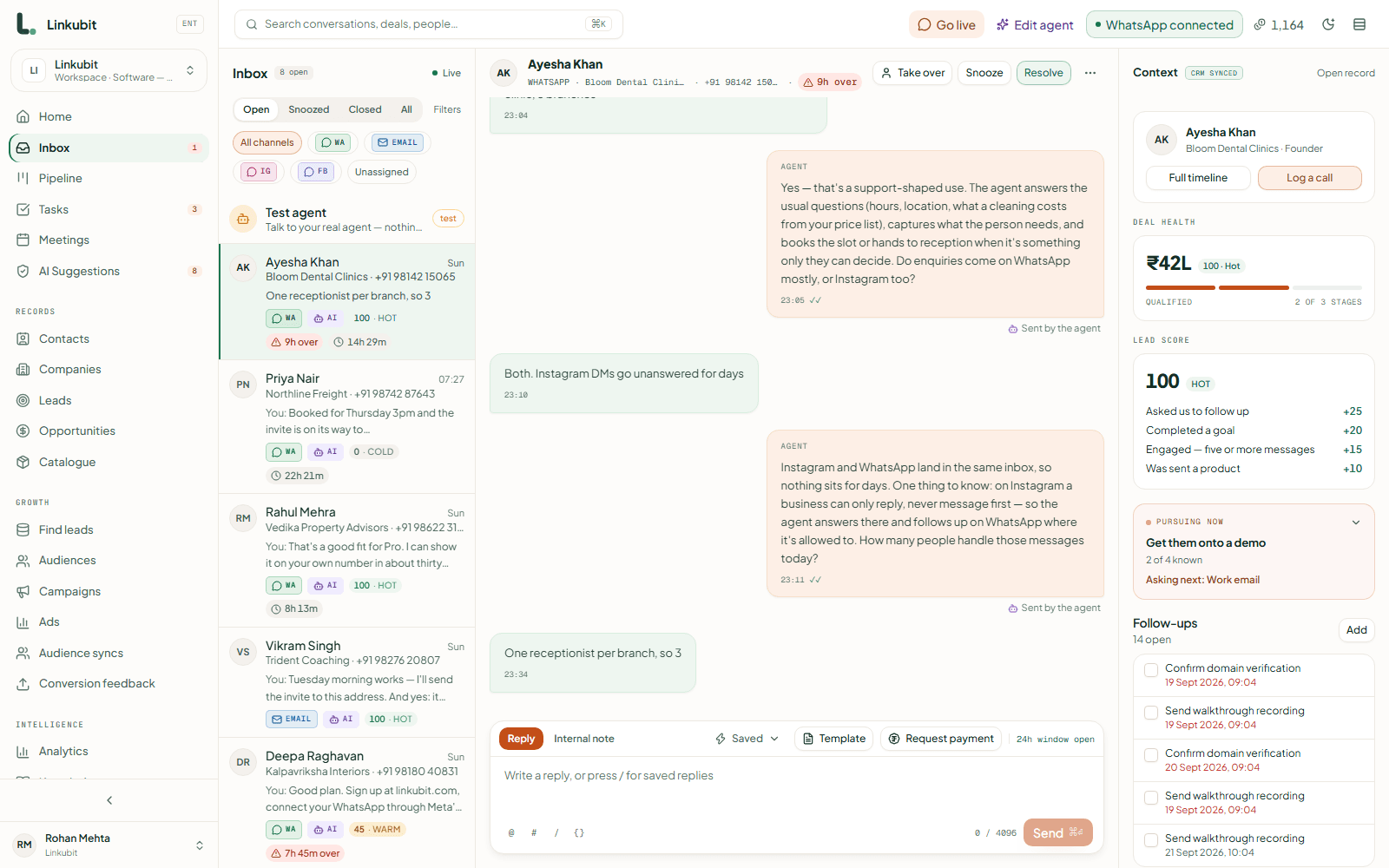
- The first reply. The customer is on the phone now; a reply in the first minute keeps them, a reply in an hour is a template to someone who moved on. Automate the answer to the question they asked — not a menu, the answer. This is where most of the lost sales are. Speed to lead.
- Qualification. The three or four things you need before you can quote — budget, locality, size, date — asked in one message, written onto the record, so the person who picks it up has them.
- The quote. From your catalogue, at your price, inside the window while it is free-form. A quote sent tomorrow is a template.
- Follow-ups that stop. A nudge at an hour, six hours, a day, written from what was discussed, cancelled the moment the customer replies. Smart follow-ups.
- Reminders and confirmations. Appointment, delivery, COD, invoice — utility templates fired by the event, once.
- Campaigns. Last, not first: a broadcast to an audience that opted in, within your messaging limit, stopped for anyone who replies. WhatsApp campaigns.
Five flows, with what each costs
| Flow | Message type | Meta's rate (India) | Consent needed | Where it stops |
|---|---|---|---|---|
| Answer an enquiry inside 24 hours | Free-form (service) | ₹0 until 1 October 2026, then ₹0.115 | No — the customer wrote first | When the question needs a person: a discount, a complaint, a rule |
| Ask qualifying questions | Free-form (service) | same as above | No | After the fields you set are filled |
| Send a quote from the catalogue | Free-form inside the window; a utility template after | ₹0.115 inside, ₹0.115 outside | No | Never invents a price: catalogue only |
| Appointment / delivery / COD reminder | Utility template | ₹0.115 | No — it is their own transaction | Once; a reply reopens the chat |
| Offer, launch, re-engagement | Marketing template | ₹0.8631 | Yes — opt-in on record | At the messaging limit, and for anyone who replied |
Where automation should stop
The point of automating the first four flows is to get a person to the fifth one — the conversation that needs judgement. An automation that keeps going past that point is worse than none: a discount promised by a script, a complaint answered with a menu, a price invented because the catalogue did not have it. The rule in Linkubit is that the assistant hands over explicitly — the thread is marked, the owner is told, and it stays quiet until it is handed back — when a customer asks for something a rule reserves for a person, when they ask for a human, or when the conversation goes somewhere the assistant has no knowledge for. When an AI should hand over.
The rules that keep you sending
- Consent for marketing. A marketing template goes only to a person who opted in, recorded with the source and time. Broadcasting to a bought list is the fastest route to a red quality rating. Consent rules.
- STOP means stop. In any language, across every campaign, the same second.
- Within the messaging limit. 250 business-initiated conversations a day for an unverified number, then 1,000, 10,000 and up. A campaign should hold the rest, not fail. Broadcast without getting blocked.
- Approved templates only outside the window, and the right category: an order update sent as marketing costs seven times as much and needs consent you may not have.
Tools: a builder, an assistant, or both
Most WhatsApp platforms — Wati, AiSensy, Interakt, Gallabox — automate with a flow builder: you draw the conversation as branches and buttons, and it answers what you predicted. That is right for a fixed menu (track my order, opening hours) and wrong for a sales enquiry, where the customer's first message is never the one you drew. Linkubit automates with an assistant: it reads the message, answers it, asks for what is missing, quotes from the catalogue, and follows the rules you wrote in plain words — on every plan from ₹0, with Meta's messages billed by Meta at Meta's rate. The providers guide compares the tools; the AI agent vs chatbot guide compares the two approaches.
What it costs, in one example
A clinic answering 600 enquiries a month with six messages each, sending 800 appointment reminders as utility templates and one 2,000-person offer as a marketing template pays Meta about ₹2,232 before GST from 1 October 2026 — the calculator prints your own figure. The software is the other line: Linkubit's Starter is ₹499 a month with 100 AI replies; the free plan is ₹0 with 30.
What is WhatsApp automation?
Messages sent or handled on the WhatsApp Business API without a person typing them in the moment: automatic replies, qualifying questions, quotes, reminders, follow-ups and campaigns. It needs the API; the free app allows only a greeting and an away message.
Is WhatsApp automation free?
The API is free to access; Meta charges per message — ₹0.115 for a utility template, ₹0.8631 for marketing, and from 1 October 2026 ₹0.115 for a reply inside the window, in India before GST — and the tool has its own fee, from ₹0.
What should a small business automate first on WhatsApp?
The first reply, because that is where enquiries are lost; then qualification, the quote, follow-ups that stop on reply, and only then reminders and campaigns.
Can I automate WhatsApp without the API?
Only a greeting and an away message, on the WhatsApp Business app. Everything else — replies to questions, templates on events, sequences, an assistant — needs the API.
Which WhatsApp automation tool is best for a small business in India?
For a fixed menu and broadcasts, a flow builder such as Wati, AiSensy or Interakt. For enquiries that need answering and closing, an assistant that reads the message — which is what Linkubit is built as. The providers guide compares them on price, mark-up and AI.
Is WhatsApp automation allowed?
Yes, on the API, within Meta's rules: approved templates outside the 24-hour window, consent for marketing, STOP honoured, and the messaging limit respected. Automation on the consumer app or through unofficial tools gets the number banned.
Read next
More on Getting and keeping leadsLinkubit vs other toolsWhatsApp templatesCost calculatorPricing
Try it on your own number. Linkubit answers, qualifies and quotes on WhatsApp from your catalogue, and adds nothing to Meta’s per-message price. Start free — fourteen days of Pro, no card — or read the pricing.