Needs you: the decisions waiting on a person, in one list
What the Needs you screen lists, how to clear each row, snoozing and dismissing for the team, Undo, and bringing back what was hidden.
Needs you is the first screen. It lists only what a person has to decide — customers waiting, follow-up going cold, and changes that would make the AI better — and leaves everything the agent handled in the Inbox. Each row has the one action that clears it; it can also be snoozed, dismissed or handed to a teammate. Hiding a row hides it for the whole team, and Dismissed and snoozed below the queue puts it back.
What is on it
| Group | What lands there |
|---|---|
| Customers waiting | Replies the agent drafted for your approval, conversations handed to a person or that the AI stopped answering (out of credits, outside its hours, paused), replies that failed to send, and payment links the agent asked you to approve |
| Sales follow-up | Overdue tasks, deals that haven't moved in 14 days, campaign messages that failed, and WhatsApp templates Meta rejected |
| Improve the AI | Setup-check findings, AI suggestions, and other changes the agent asked for |
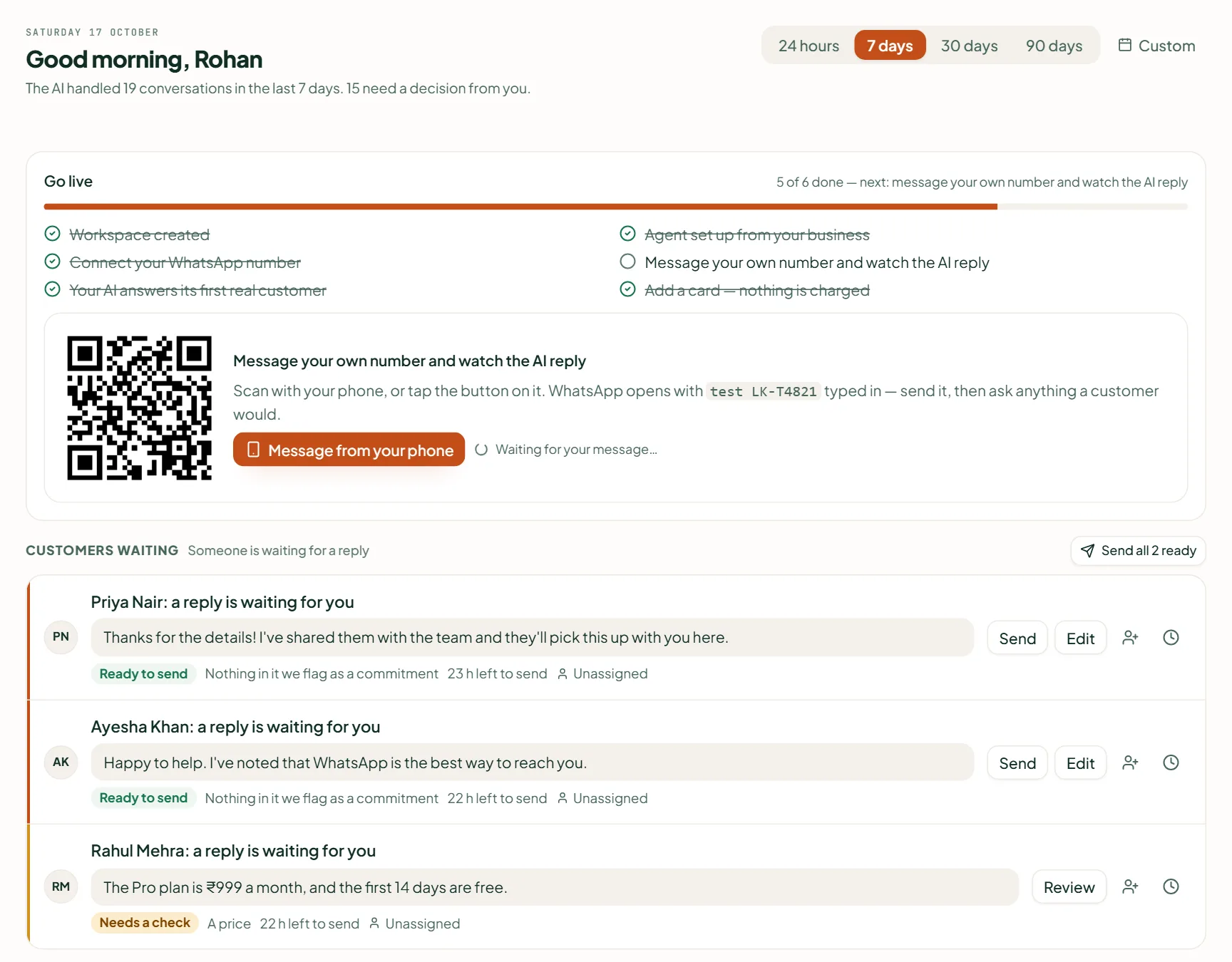
The panel beside it filters to one group, each with its count. A kind shows up to 20 rows; past that the queue says how many more and links to the screen where they live. Below the queue is How the business is doing — see Read the Needs you and Analytics screens.
Clear a row
- A reply waiting. A draft marked Ready to send — nothing in it commits you to a price, a date, a discount or a refund — has Send and Edit right on the row. One marked Needs a check opens the conversation, so you read it in context. With two or more ready, Send all N ready shows them, sends each through the same checks as the inbox, and lists any that didn't go and why.
- Everything else has one button that takes you where it is fixed: Open chat, Open tasks, See the deals, See campaigns, Fix template, See the fix or Review.
- Assign (the person icon) hands a conversation — with its contact, lead and open deal — or a task to a teammate. Each row says who has it now.
Snooze or dismiss
- Snooze (the clock) puts a row off: Later today (3 hours), Tomorrow (9 am) or Next week (Monday, 9 am), on your workspace's clock. It comes back then, or sooner if anything about it changes.
- Dismiss (the ×) clears a row you don't need to act on. It comes back only if something about it changes — the customer writes again, the task is re-dated, a newer send fails. A draft can't be dismissed; it is sent, rejected or snoozed.
- Both are for the whole team: the toast reads Dismissed for the team or Snoozed for the team, with Undo for a few seconds.
Related
Stuck? Write to help@linkubit.com with the screen you are on and what it says. Not using Linkubit yet? Start free — fourteen days of Pro, no card.