Connect Instagram and Messenger to the Linkubit inbox
Connect your Facebook Page and its linked Instagram account in one Meta window so DMs and Messenger chats are answered from the same inbox. Reply-only.
Settings › Instagram or Settings › Messenger opens the same connect card: press Connect Instagram & Messenger, tick your Page and its Instagram account in Meta's window, and new messages arrive in the inbox. Meta allows replies only — the agent within 24 hours of the customer's last message, and after that only a person, up to seven days after it. Pro and Scale.
Before you start
- A Facebook Page you can message as. Messenger conversations belong to it.
- For Instagram, an Instagram professional account linked to that Page (Instagram settings › Accounts Center, or the Page's Linked accounts). Without the link, Messenger connects on its own.
- Permission to connect channels in Linkubit, and a Page role that lets you message as the Page.
Connect
- Open Settings › Instagram or Settings › Messenger — they carry the same card — and press Connect Instagram & Messenger.
- In Meta's window, tick the Page and its Instagram account. Leaving the Instagram account out connects Messenger only.
- If you shared more than one Page, pick the one whose messages Linkubit should answer and press Connect.
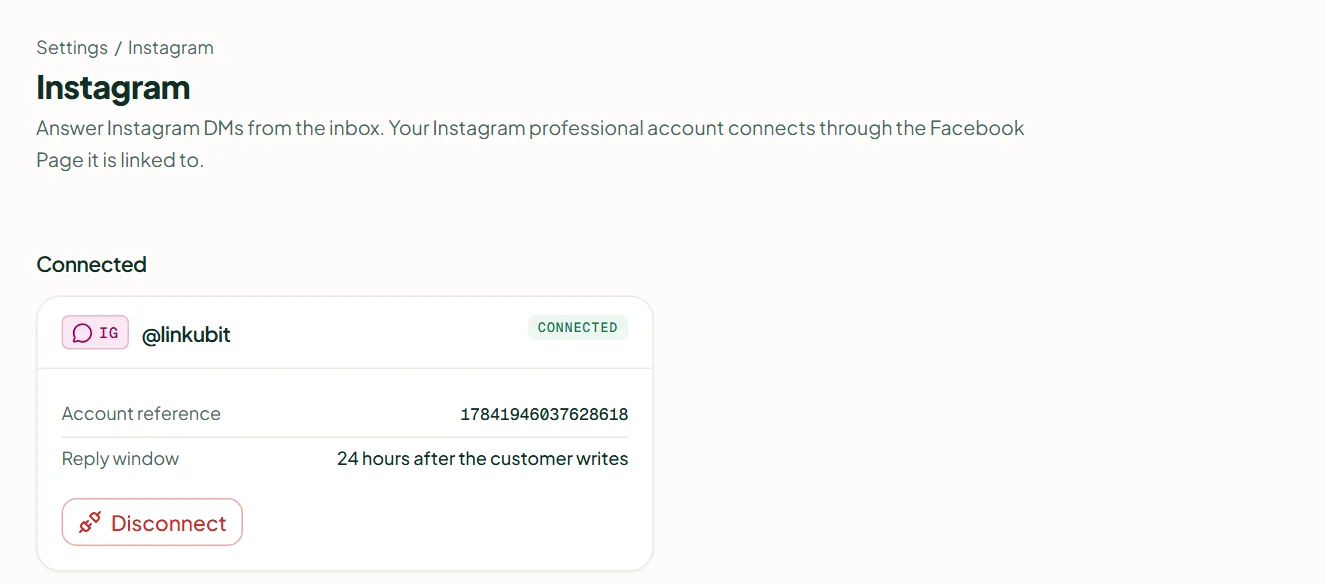
- The notice is titled Connected and reads "… — new messages arrive in the inbox from now on."
What Meta allows
- Replies only. A business can answer a customer who wrote first; there is no business-started messaging and no Instagram or Messenger campaigns. There are no templates.
- The AI agent answers freely for 24 hours after the customer's last message. After that only a person can reply, until 7 days after the customer's last message, and Linkubit sends it with Meta's HUMAN AGENT tag — the tag says a human wrote it, so the agent never uses it.
- In the composer the header shows "24h window open" or how long is left, and a banner appears as the window nears its end.
Disconnect
Disconnect on the channel's card asks for confirmation. New messages then stop arriving and are dropped, not held, so they do not replay if you reconnect; the agent and inbox can't reply; past conversations are kept. Instagram and Messenger are separate rows — disconnecting one leaves the other.
I don't see Instagram or Messenger in Settings.
They need the Pro or Scale plan. On other plans the screen shows an upgrade card.
It says the Page is already connected to another workspace.
A Page or Instagram account can belong to one workspace at a time. Disconnect it there first.
Related
Stuck? Write to help@linkubit.com with the screen you are on and what it says. Not using Linkubit yet? Start free — fourteen days of Pro, no card.